
You use the same programs every day when you work but you still have to keep confirming the User Account Control messages that pop each time you start the computer. This is annoying. On the other hand, such strict control also means better security which is why you should never completely switch off User Account Control.
You can permanently authorize programs and after doing so, Windows abstains from showing the system messages when these programs start. Use the Microsoft Application Compatibility Toolkit for this. Vista requires authorization when applications such as tuning tools, developer tools, registry editors, security programs or even some games want to access system resources.
INSTALLATION:
-
First download the 11 MB MSI file of the toolkit from www.microsoft.com/downloads/. For this, search for “Microsoft Application Compatibility Toolkit” using the search function on the website and go to the link which has the same name that appears on the results page.
-
On the following page, click “Application Compatibility Toolkit.msi” in the program list and save the file on your PC. Installation takes place after you double-click on the file.
-
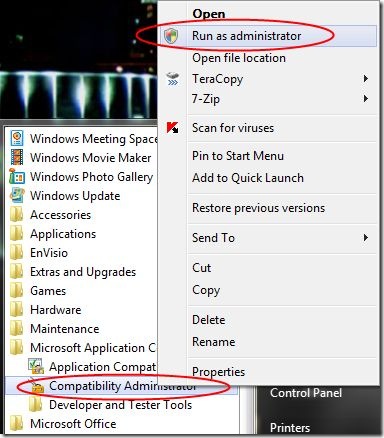
Now open “All Programs > Microsoft Application Compatibility Toolkit”, right-click “Compatibility Administrator” and select the “Run as administrator” context command.
-
Confirm the User Account Control by clicking “Next”.
ISOLATING PROGRAMS:
-
In the window that you see, right-click “New Database(1) [Untitled_1]” and select the “Create New > Application Fix” context command.
-
In the following dialog, enter the name of the program you want to customize settings for and click “Browse”.
-
Now navigate to the program file, select it and click “Open”. When selecting the operating system, select “None” and then “Next”.
-
In the “Compatibility Fixes” list, activate the “RunAsInvoker” option. This ensures that the specified program can be run with the rights of the super ordinate object without further enquiry. Click “Next”.
-
The following dialog defines additional criteria which you can use to identify each program, so that infected software cannot hide itself inside an application you have fagged as safe.
-
Do not change the default specifications, and click “Finish”.
ACTIVATING THE CONTROL:
Now, you have created a user database that defines Vista’s behavior when starting the selected programs. You still have to save and activate them.
-
In the dialog “File > Save As”, specify a storage location and file name of the SDB database “Safe_Program.sdb” for instance in the Windows folder.
-
Now activate these programs. For this, close the tool kit, start an entry request as administrator, type the following command ‘sdb inst C:\Windows\Safe_Program.sbd and press [Enter].
Start authorized applications as administrator by right-clicking on the program’s icon and this immediately
prevents other security dialogs.
This article will help the internet visitors for creating new blog
or even a blog from start to end.