
Making your own Google gadget is surprisingly easy—you just need to have an idea of what are you going to “gadgetise,” and a few clicks later, you’ve got yourself a brand new gadget. you won’t immediately be allowed to put your gadget on your Blogger page, but it’s a start.
Start with a site whose contents you want to see in the gadget—I chose www.pcsplace.com. Open www.dapper.net, a site that allows you to take content off any page and transform it into a variety of formats like XML, RSS feeds, Google Gadgets, Netvibes Modules, etc. Choose Google gadgets. Then you put in www.pcsplace.com in the address bar, Dapper opens a frame with the site in it. Navigate to the Tips and Tricks in the categories and click it. After the page reloads, Click on Add to Basket to add this section to your gadget.
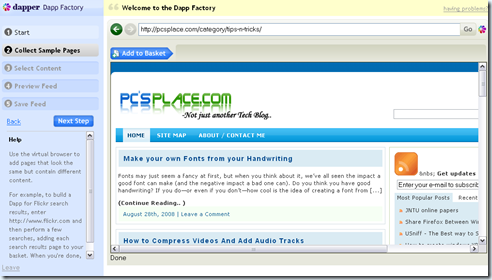
Choose the fields using the Select arrow at the top. The fields that will go in your Dapp are highlighted in yellow. This is a bit tricky, as the yellow patches have a way of getting on unwanted content like ads or links. If you don’t select well, your Dapp(applications made with Dapper) will be worthless. Give a common name to your group of content— I selected “Tips and Tricks
Click Next to view the content that has been selected. Here, we’ve got a list of the games that have been reviewed in the magazine. This list will now be updated when the site is.
The final step is saving your Dapp—name, describe and tag it, then click Save. If you’re unsure of whether your Dapp works right, check the This is a test Dapp box—the Dapp will be deleted within 24 hours. Alternatively, if you don’t want your Dapp published in Dapper’s directory, check the Make Private option. After hitting Save, you’ll get to make some final settings, and also preview your gadget. You can add it to your iGoogle page, or publish it in the iGoogle directory.
Only if (and this is a big if) your gadget gets listed in the Google directory will you be able to add it to your Blogger page. Google takes its own time, so it’s best to remain content with adding the gadget to your iGoogle page.
I have recently started a site, the information you offer on this site has helped me greatly. Thank you for all of your time & work.
I was wondering if you ever thought of changing the page layout of your blog? Its very well written; I love what youve got to say. But maybe you could a little more in the way of content so people could connect with it better. Youve got an awful lot of text for only having 1 or 2 pictures. Maybe you could space it out better?
I love what you guys are up too. This type of clever work and reporting! Keep up the wonderful works guys I’ve incorporated you guys to our blogroll.
i must have been sourcing high and low at the wrong places but THIS is what i am looking for. thank you for this insightful post!
Getting rid of these blood sucking creatures is a major problem. There are many professional exterminators that are available that is equipped with all the ingredients to get rid of them. But there are also some home remedies that can help you to get these blood sucking creatures away from your sweet home before you could hire a exterminator, thoroughly wash, vacuum or fresh all surfaces and bedding, normally use hot water and a dryer in the affected areas, vacuum the mattresses, seal them in plastic and dry them in the hot sun so long as possible, steam clean carpets, spray cracks and crevices with the insecticides that are meant for killing bed bugs and if it still persists go ahead and hire a professional. So let’s start killing!
I´ts erect to judge we hit evolved so overmuch in so small moment when compared to case frames. Parting 10 were conclusive when it comes to profession and gadgets
Considerably, the article is in reality the freshest on this notable topic. I fit in with your conclusions and will eagerly look forward to your future updates. Just saying thanks will not just be adequate, for the great clarity in your writing. I will at once grab your rss feed to stay informed of any updates. De lightful work and much success in your business endeavors!