
Installing Windows Vista over Windows XP is pretty simple. But If you are a XP lover like me, you can even Install Windows XP over Windows Vista. One way of doing this is a clean install of XP which is done by formatting the drive and installing a fresh copy of XP over it. The other way is as follows..
To install Windows XP, first you need an empty partition. If you don’t have one, use computer Management or any Partition Management Software to resize the existing partition and make space for a new partition in the hard disk.
Under the Disk Management application, right click on the partition and click on Shrink Volume. choose the space you want free after the shrinking process. change the drive letter of your CD/DVD drive to avoid any confusion by right-clicking on the drive and then clicking change drive Letter and Paths.
Now right-click on the empty space created and click on New Simple Volume and create the partition with the right drive letter. Boot using the XP installation CD and install it.
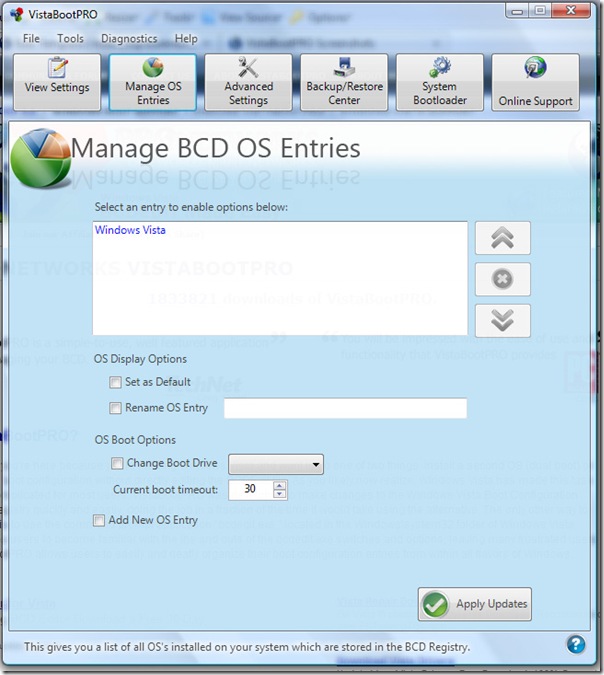
You will then no longer be able to boot into Windows Vista. Now, Boot into XP and install a software called VistabootPrO which will allow you to make entries and changes to the boot record. This software is useful for Dual booting Windows XP, Vista and also for the latest Windows 7.
plzzzzzzz anyone help me get vista out of my laptop. m not able to install xp.. it shows that install xp is disabled when i put the cd…… plz help me……… i just made a blunder by installing vista….. strongly recommend to all my friends, don’t use vista.
I’ve been following your website for 4 days now and I ought to inform you I get tons benefits from your article. and now how I can get news replace out of your web site?
I installed XP professional over Vista. I reformatted the hard drive and installed e fresh version of XP. Where do I get the drivers for “Other Devices”? Which include the ethernet adapter?
i go to install window’s XP service pack 3 when i am on vista home premium i put the disc in the CD drive then i restart i computer and then it says push any key to continue to boot from CD and then it goes black screen on me and i cant see anything or do anything and after a while when i push a button it makes loud beeps and then it goes to the blue screen of death (even is i dont push any buttons it still goes to the blue screen of death please can some 1 help me thank you
Sup, all is well, except for one (hopefully) small thing:
I receive a BSOD dude, upon booting the system via/ with XP;
It does not even let me enter the screen where I can choose to delete or create partitions on its hard drive;
Mind, you, that I wish to perform a clean install of Windows XP on a Windows Vista Home Premium OS, that’s fresh from the manufacturer delivered, with Serial Key and all;
All I can say is, good luck cracking that (security) code.
Any insights to (re)solve this (issue) would be greatly appreciated.
Holla, if ya hear me … …
BSODs are a big pain. I suffered one recently. Try the procedure again. You can perform a clean install.
very easy process.thanks
I’am using Vista and want to add xp on it. After finishing my xp installation i cannot go to my vista because it will automatic load the xp. At boot enty i didn’t see the os entry when using this Vistabootpro v3.3. Can you help me how to use this vistabootpro. Sometimes i can see the os entry and then when i choose vista can load to win vista, then when i reboot my pc and choose the win xp, it got error and cannot find /ndln… and it tell me to repair my windows xp. how this happen? can you please help me to solve this problem?
sorry for my bad english. hope to get some tips from you soon. thanks