
The Flickr photo community has scores of interesting photos. Some of them would make excellent desktop backgrounds. But when downloading, only the empty file “spaceball.gif” is downloaded on your computer.
If a Flickr user does not want his photos easily available for download, he can set a corresponding access setting in Flickr. If we try to download or save the picture, it then automatically displays the transparent file “spaceball.gif” instead of the photo. You can easily overcome this setting and download any blocked, restricted or locked photos from any website using the following trick in Firefox.
-
As soon as the download dialog displays the “spaceball.gif” file for saving, abort the action and right-click next to the photo.
-
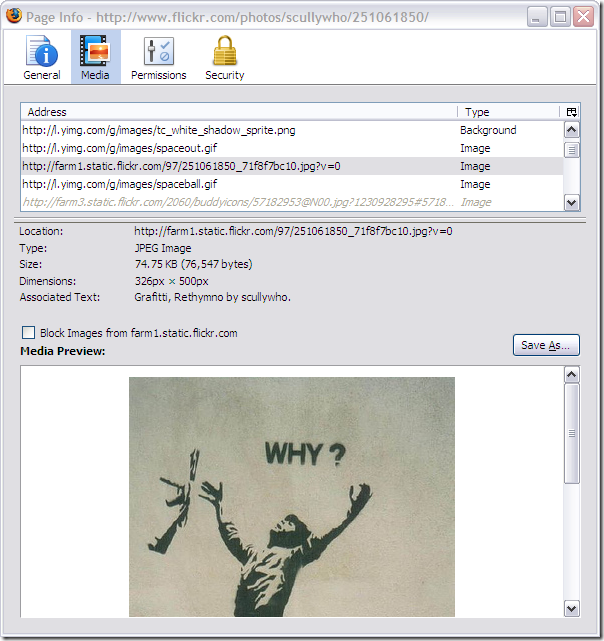
Then select the “View Page Info” context command and activate the “Media” tab.
-
The list shows all the graphics on this page. Click an entry to see the preview in the lower part of the dialog box.
-
Keep scrolling till you find the desired image.
-
Then click “Save As” and save the image on the hard disk.
There are other specialized add ins that also facilitate the download of blocked photos. You can completely stop Flickr from showing the transparent file by using the Adblock Plus ad blocker. You can download this tool free of cost from https://addons.mozilla.org/en-Us/frefox/addon/1865.
As soon as the add-in is installed, right-click the superimposed photo and select the “Adblock Plus: block graphic” context command. The link to “spaceball.gif” is selected in the first line. Simply confirm the dialog with “OK”.
In the future, you will be able to download all Flickr photos as usual using the context menu. Similarly, the superimposed graphic can be blocked with the Nuke Anything Enhanced add-in.
NOTE: The user intends to prevent unauthorized use of his photos when he blocks them. Thus, you should make it a point to observe the license clauses and not use the photo without the consent of the person who has blocked it.
I’m using the program called “downloadFlickr” its a lot easier, and totaly free!
Thanks. This is why my stuff is watermarked with a complex design and embedded with data (yes, easily removed). Buy the image; and don’t whine about the watermark.
BTW – the internet size only idea is a massive fail. Most theft IS FOR INTERNET use by the blog losers using the keywords to draw in ad revenue.
as mentioned in the article, most of the people want to download flickr images just to set it as desktop background. there are very few ones who will commercially use the image without paying the owner for the image.
to prevent the misuse of the image, a good way is to post a low resolution (like 640×480) one on flickr, so if someone manages to download it, it will be of no use for them. watermarking will also help.
the best way- don’t post images your work on the internet especially if you are a professional photographer.
Anything that can be displayed in a web page (or even flash or something else) can be captured in some way. As someone mentioned, even if the original photo can’t be directly downloaded it’s pretty easy to do a screen capture.
It has been like this for at least 15+ years and probably will continue to be this way, though there are some things that may discourage casual copying such as Flickr’s spaceball.gif or embedding a photo in a Flash application.
I understand why content owners might want to protect their work since I create content myself. Honestly, the best way to protect your high resolution photographic assets is not to post them on the web for everyone to see. The usual solution is to only put up low resolution copies that are of limited use. If someone wants the high resolution copy then perhaps they need to contact you or put that function behind an authenticated area.
For the person who wants to know how to “block” photo downloading like Flickr does. There are a few ways. One way is to make your photo a background image with css and then possibly put another transparent image atop it, so when right clicking to download, people end up downloading the transparent image instead. A variation is to put your images in layers with the top layer being a transparent gif. You’ll need to look at css/html tutorials about layers to figure out how to do this if you don’t know how.
The layers technique of “securing” your images is about as secure as hiding your house keys under the flowerpot next to your front door. It might prevent some extremely naive people, but anyone who has the slightest clue will figure it out pretty easily.
It’s not like this article gives anything very unknown away. Just like people who wanted to get into a house would know to look at the obvious place to hide keys. Only post assets on the Internet that you’re ok with people seeing and getting (and possibly repurposing). It’s available to the public, just as if you left it on the street outside your door. For the stuff that’s valuable, don’t leave it on the street for anyone to look at or copy.
There are ways you can find your image on the internet (see http://www.tineye.com/ for example) and you want to spend some time going after copyright infringements, but your best choice is not to let the genie out of the bottle if you don’t want something out in the world.
Fine info. I value your hard work, superb share.
What a great journal. I spend hours on the cyberspace reading blogs, about tons of different themes. I have to first of all give congratulations to whoever built your theme and second of all to you for writing what i can only describe as an astounding post. I honestly believe there is a skill to writing articles that only a few posses and honestly you have it. The combining of educative and quality content is by all odds super rarified with the king-sized amount of blogs on the net.
photograph hey.. very nice! ^^
I’m also a professional photographer, and always worry about copyright infringement. Actually, the reason I’m here is because somebody stole an image from my site and posted it on theirs despite the copyrights being clearly posted. Unfortunately, there’s not much we can do… except watermark images and keep them sized to be only useful for internet use. As far as flickr, or any other website you post photos to, I would advise not releasing high-resolution, un-compressed and un-watermarked images in the first place.
Anyways… I’m trying to find out how to make this “spaceball.gif” code work for my personal website. Does anybody know the code, or a program that will generate the code in HTML or Javascript? I would really appreciate it.
well adam… i think even that wouldn’t work… since they have stuff like “print screen” these days and even if the image or the photo is unable to copyright, they can take the pic of the wohle website by using this key… So as far as i think, the sercuyrity for ur photo isn’t strong at all… So wat i’m saying is i think u better put or sign or signiture,,, This might work to protect ur photos. cause think man. They can’t get rid off the signiture. Well they can by cutting ur pic. However, u can prove that this is ur pic by show the original pic and the person who stole ur pic will have only the cutted part of ur pic. Which means the photo is urs forever….. i hope i helped u… well if u don’t get wat i said, given me ur mail address… make a new email since someone else might be able to prank and black mail u./….. ^^
Also the “spaceball.gif” is good. But i’ve seen this program they used in korean website which is awesome… Like when u try to click the picture, u can’t cause the website program cancels it. So it is very usful… however i have no idea about this. So i recomend using the yahoo answer. ^^
Well, with that knowledge my chances of being ripped off as a photographer just increased exponentially. I know when I post on Flickr it could happen, but I play by the rules to allow other people to enjoy my work and be a part of the community. People who use this kind of technique are not being very community-like are they? This is akin to a burglar coming into your home at midnight with the keys in hand. Yes, you have used a disclaimer to excuse yourselves should anything happen. Yet, those who read and use this information are not going to really care are they?
Happy?
This is for educative purpose.. I am not encouraging to do anything wrong.
Another easy way is to Left click on the image and drag it to the address bar.. right click and save it!