
There are many Burning software which will perform your required operations. Every one of them have their own problems and out of them the best one will be ImgBurn. It is a lightweight CD / DVD / HD DVD / Blu-ray burning application that everyone should have in their toolkit.
It supports Unicode folder/file names, so you shouldn’t run in to any problems if you’re using an international character set and it supports all the Windows OS’s – Windows 95, 98, Me, NT4, 2000, XP, 2003, Vista and 2008 (including all the 64-bit versions). Using Wine will make it run on Linux and other x86-based Unixes too.
It’s a very flexible application with several advanced features that are often lacking in other tools, especially when it comes to burning DVD Video discs. It supports all the latest drives without the need for updates (including booktype / bit setting / advanced settings on many of the major ones – i.e. BenQ, LiteOn, LG, NEC, Plextor, Samsung, Sony).
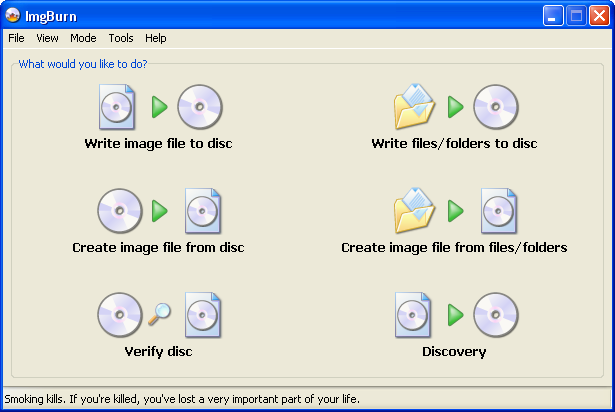
ImgBurn supports a wide range of image file formats – including BIN, CUE, DI, DVD, GI, IMG, ISO, MDS, NRG and PDI.
It can burn Audio CD’s from any file type supported via DirectShow / ACM – including AAC, APE, FLAC, M4A, MP3, MP4, MPC, OGG, PCM, WAV, WMA and WV.
You can use it to build DVD Video discs (from a VIDEO_TS folder), HD DVD Video discs (from a HVDVD_TS folder) and Blu-ray Video discs (from a BDAV / BDMV folder) with ease.
There are many advantages with Image Burn software like..
- It cycles the tray for verification, which is a nice touch.
- It has NO bloat at all.
- It starts fast.
- It burns cleanly and quickly.
- It is small!!!!
- It seems to work well.
- It has many advanced options.
- It is a great image burner, creating images easily and boot images also, but ok, all burning software will do that.
- It supports perhaps ALL image extensions, which means you don’t have to convert it.
Along with advantages it also have some small disadvantages like you have to choose what you want to add before you look, either files or folders, and IB gives you two choices, instead of one choice–search for files or folders and also the navigation is tough with popups. But these can be easily neglected when compared to the features it got.
My conclusion is that you could use this software as this is too good a program for a Freeware. I’d like to suggest this as a reliable alternative to Nero that can burn images, data, and audio CDs, although burning audio CDs . If you want a change just give it a try. Download it by Clicking Here.
hello there and thanks to your information ? I have certainly picked up anything new from proper here. I did on the other hand experience several technical issues the usage of this site, as I skilled to reload the web site a lot of times prior to I may get it to load properly. I were pondering in case your web host is OK? Not that I am complaining, however sluggish loading circumstances instances will sometimes have an effect on your placement in google and could damage your high-quality rating if advertising and marketing with Adwords. Anyway I am including this RSS to my email and can look out for much extra of your respective interesting content. Make sure you update this once more very soon..
Borgore is confirmed for Electric Daisy Carnival. 34