
If you are trying to format and reinstall Windows Operating System. You need to again set up permissions and names for the software and settings that you would install after a format. Using a simple trick, we can backup the registry settings with the registry ( .reg ) file and can easily use it. every time after you format your PC. Here is a way to back up and restore all the share names and permissions from the old Windows installation to the new one.
-
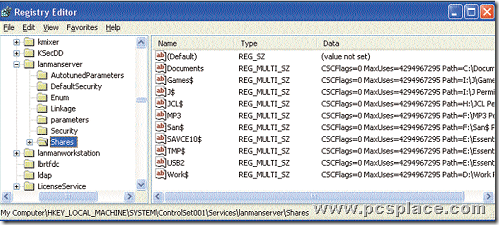
Open the Registry editor. From the HKEY_LOCAL_MACHINE sub-tree, go to the following key:
SYSTEM\CurrentControlSet\Services\LanmanServer\Shares -
Save or export that Registry key.
-
Type in a new file name (a file extension is not necessary), and then save the file to a storage device.
-
Reinstall Windows and run the Registry Editor.
-
Restore or import the Registry key. You’ll need to type in the path and file name of the file you saved.
-
Restart your PC.
You can always restore your previous configuration by pressing [F8] at bootup and selecting the “Last known good configuration” option.