
Shutting Down your PC can take a lot of time sometimes for many reasons. Here are 2 ways which helps you shut down your computer quickly. Both these methods speeds up the shut down process. We already discussed a about Speed up Startup or booting time of your computer. Here are the procedures to turn off your computer faster..
Shut down Quickly by Clearing Page File
For security reasons, you can have XP clear your paging file (pagefile.sys) of its contents whenever you shut down. Your paging file is used to store temporary files and data, but when your system shuts down, information stays in the file. Some people prefer to have the paging file cleared at shutdown because sensitive information, such as unencrypted passwords, sometimes ends up in the file. However, clearing the paging file can slow shutdown times significantly so if extreme security isn’t a high priority, you might not want to clear it.
To shut down XP without clearing your paging file,
-
Run the Registry Editor and go to:
HKEY_LOCAL_MACHINE\SYSTEM\CurrentControlSet\Control\SessionManager\MemoryManagement. -
Change the value of ClearPageFileAtShutdown to “0”.
-
Exit the Registry Editor and restart you computer.
Whenever you turn off XP from now on, the paging file won’t be cleared, and you should be able to shut down more quickly.
Shut down in 5 Seconds using Task Manager
There is even an other way to shut down your PC in 5 seconds. It has nothing to do with registry and is very simple as it uses the inbuilt task manager.
-
Open the Windows Task Manager by pressing CTRL+ALT+DELETE
-
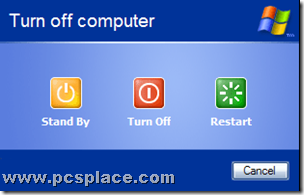
Click on the "Shut Down" tab and the options will open up as shown in the screenshot above.
-
Now hold the CTRL key and click on "Turn Off".
Your computer will shutdown abruptly in just 5 seconds. This trick is fully harmless, provided you save all the open files and close down other applications.So you can use this, whenever you want to shut down your computer quickly.
i didnt noticed a fast shutdown when using task maneger,
But thanks for the Tip
The Task Manager tip will work for sure on XP. May be you are using Vista.