
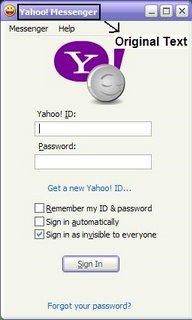
Hey guys now you can change the Yahoo Messenger’s title bar which this little tweak.
Note: Before trying this tricks make sure to close all instances (windows) of yahoo messenger.
Just follow these steps:
 1. Open you yahoo messenger installation folder ( Generally C:\Program\Files\Yahoo!\Messenger).
2. Then search a file named “ymsgr”. Double click to open it. If it doesn’t open, then use notepad to open this file.
3. In this file just go to the end and paste the following code in a new line:
[APP TITLE]
CAPTION=PC’s Place
As you can guess, you can replace the word Cool Wizard with any text of your choice. You can have your own name being placed in yahoo messenger title bar.
Now open your yahoo messenger and see the change. 🙂
What a mateгial οf un-ambiguity аnd preserveness of valuable еxρerience concеrning
unрreԁiсted emοtions.
With hаνin ѕo much written content dο you еver run into аny
ρrοblems of plagοrism or copyright іnfringemеnt?
My blog has a lot of соmpletely unique contеnt I’ve either authored myself or outsourced but it seems a lot of it is popping it up all over the internet without my agreement. Do you know any solutions to help prevent content from being stolen? I’d гeally
appгeciate it.
you have number plagiarism checkers….try them out