
You can improve Adsense CTR ( Click Through Ratio ) by changing the font of the Google ads. A new feature is introduced using which you can customize your Adsense ads. Now you can change the font face of the text in ad units on pages in Latin-character languages. You can choose between Arial, Times, and Verdana font faces. These will currently only be applied to ad units on pages primarily in Latin-based characters.
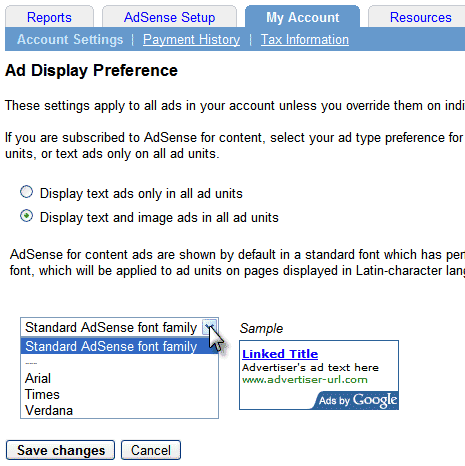
To change the Font face of your ads, Login to Adsense account and click on ‘My Account’ tab. By default, ads will have standard Adsense family font. You can change them to Arial, Times or Verdana. This change will apply to all ad units in your account.
You can also specify different font face for different ad units by going to Manage Ads and editing the code settings to set your required font.
Only 3 fonts are available now and I guess more will be coming soon. So, Now you can customize your ads according to your style of your theme and with this additional feature, you can increase Adsense CTR as the ads will look similar to the content.
Hello there, simply became alert to your weblog via Google, and discovered that it’s truly extermly informative. I’m going to be looking for updates. I’ll be grateful should you proceed this in the future. A lot of folks can be benefited from your writing. Cheers!
Hello there, simply became alert to your weblog via Google, and discovered that it’s truly extermly informative. I’m going to be looking for updates. I’ll be grateful should you proceed this in the future. A lot of folks can be benefited from your writing. Cheers!
Happy to see you are lending this topic more press. It could really use it.
okay. let me try that!
Oh, that’s awesome.
I wasn’t know that 😀