
How To Make Your Own Orkut Themes
The social networking platform Orkut has now has a feature to set a theme for your profile. It means you can make your own orkut themes of your choice as there are limited themes available. Here is an easy way to customize your profile by making your own Orkut themes..
All that you need to make your own theme is Firefox + Greasemonkey. With these you can build your own Orkut themes in just a few seconds. Here’s how:
1. The Greasemonkey should be installed firstly. here are the links.
Greasemonkey for Firefox 2 | Firefox 3
2. Go to this page, and enter the url of a valid image. ( You can get your images by googling images you want here.
Take care that the image url should be correct and should match the width of the Orkut page or else the image will be repeated.
3. Click on the submit button and you’ll get the Greasemonkey script with the background image of your choice.
That’s it and the new theme will be yours. If you are already using an official theme, then make sure you switch back to the classic theme before using the custom Greasemonkey theme. You can configure the Greasemonkey add-on to remove the theme if you don’t like it.
Here is a list of Free Orkut Themes
These Custom themes will take more time to load because it has to fetch the image from an external source after the page is fully loaded. But if you want to be special then go for a change and make your profile unique.
Another Easy Method to Create Your own Theme :
Orkut Theme Generator lets you create your own orkut themes.
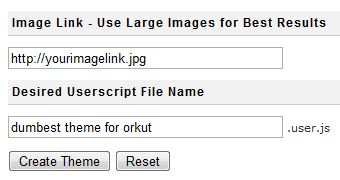
If you are interested to see a different theme in your orkut profile, go here and enter an image URl to use as a background image for your new theme and give a name to your theme and click create theme. Voila you now have the most beautiful orkut theme in the world.
Once you hit the button it will generate a userscript for the same, you can add this userscript to your browser to get the new theme. You need Greasemonkey addon for userscripts to work in Firefox.
If you liked this article you can Subscribe to my RSS Feed or Subscribe by Email
Related Posts :
- Free Orkut Themes
- Keyboard Shortcuts For Orkut
- How to Make Orkut Suitable for WideScreens
- Orkut Trick - Add a Formatting Bar to Orkut ScrapBook
- Create Custom Templates For Web Pages Easily Using Nvu!


June 26th, 2008 at 2:45 pm
How would that help? Only the person making it would be able to see the new theme, that too only in Firefox, and only in the same computer where the script is stored! My visitors will still see the boring classic orkut theme!
I guess we just have to wait until Google listens to our prayers!
July 29th, 2008 at 1:37 am
these many techniques have broked out nut not even single was worked out…!!!and not even one orkut profile has been changed…!!
July 29th, 2008 at 7:14 pm
@vipul
This is a checked procedure. It worked fine for me. Try with a perfect picture and it will work for sure.
August 2nd, 2008 at 12:10 am
This not satisfied me.only i can able to see the created theme not my visitor. this is worse
August 15th, 2008 at 1:35 am
it is good
August 27th, 2008 at 9:11 pm
Going to try this now.
September 8th, 2008 at 10:59 am
[...] use to personalize your page. These Free Orkut Themes can be installed very easily. You can even make your own Free Orkut Themes. These Free Orkut Themes are Java Scripts which can be installed easily way by following these [...]
September 18th, 2008 at 11:08 am
[...] How To Make Your Own Orkut Themes and Install Free Orkut Themes for Your Profile [...]
September 18th, 2008 at 6:03 pm
This trick only changes your theme locally so only you ‘ll be able to see the change in firefox . Your profile page in Orkut ‘ll never get changed. Try opening the profile page in ie or from your friend’s pc.
September 19th, 2008 at 8:35 pm
[...] How To Make Your Own Orkut Themes & Install Free Orkut Themes for Your Profile addthis_url = ‘http%3A%2F%2Fpcsplace.com%2Forkut%2Forkut-trick-add-a-formatting-bar-to-orkut-scrapbook%2F’; addthis_title = ‘Orkut+Trick+-+Add+a+Formatting+Bar+to+Orkut+ScrapBook’; addthis_pub = ‘pcsbox’; ADVERTISEMENTS [...]
September 21st, 2008 at 1:40 pm
i am not able to perform the needed task
September 21st, 2008 at 3:40 pm
@sandeep..
If you do according to the procedure , you can get the result.
September 21st, 2008 at 4:29 pm
[...] How To Make Your Own Orkut Themes & Install Free Orkut Themes addthis_url = ‘http%3A%2F%2Fpcsplace.com%2Forkut%2Fhow-to-make-orkut-suitable-for-widescreens%2F’; addthis_title = ‘How+to+Make+Orkut+Suitable+for+WideScreens’; addthis_pub = ‘pcsbox’; ADVERTISEMENTS [...]
November 6th, 2008 at 6:47 pm
hi i wan ma own theme wid addie
November 22nd, 2008 at 10:33 am
Hey ! I have Found anothe Theme Generator Page and that is really cool only need to enter image file and u can easily create that .Visit the page Here