
After installing a network card for the connection of a DSL modem, the PC boots up very slowly. It does not react for minutes together, and then suddenly everything starts functioning smoothly. This article explains Why it happens and how can you prevent it.
The emergency brake in this case is the ‘Dynamic IP address allocation’. The reason why your system slows down so much during start up is because the network in which the DSL modem is integrated works with TCP/IP. This protocol differentiates between each device in the network because of their unique IP addresses.
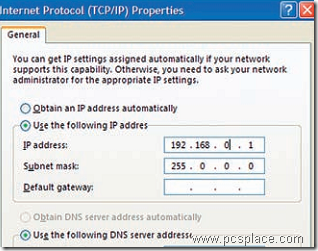
If no addresses have been fixed, Windows tries to take them from a DHCP server (Dynamic Host Configuration Protocol) when the system starts. It dynamically allocates an IP address to each device. Since, DSL modems, unlike DSL routers, have no DHCP server, Windows unnecessarily waits for an answer and decelerates your system in the meantime. You can stop this by setting up a fixed IP address. Follow these steps to go about doing this:
-
Go to ‘Start > Settings > Network connections’.
-
Here, right-click on the ‘LAN connection’ to your DSL modem and select the ‘Properties’.
-
Mark the ‘Internet Protocol (TCP/IP)’ in the list and again click on ‘Properties’.
-
Activate ‘Use the following IP address’ the option in the following dialog.
-
Here, the entries for ‘IP address’ and ‘Subnet mask’ are important. You need not edit ‘Default gateway’ and all other values listed below. You can use ‘192.168.0.1’ as ‘IP address’, for instance, but not any address.
The address range ‘192.168.x.x’ (x = 0 to 255) is reserved for local networks, values other than these can lead to problems. Use ‘255.255.255.0’ as subnet mask. Then confirm twice with ‘OK’ and restart the PC. If you have set up more LAN connections, allocate fixed IP addresses for them too.
I got a clear idea to sped up the starting time of my system.