
Sometimes it is just not possible to delete a file. Windows Explorer refuses access to the file with an error message which says, for instance, that other programs are currently using the file. The same happens even after you restart the computer. You can delete blocked or restricted files in Windows explorer easily.
Check out How to Delete Files Blocked by a Program / Application using Process Explorer
Here goes the procedure..
-
Close all running programs as well as the icons in the system tray.
-
Now open the prompt using ‘Start > Run’, type ‘cmd’ and click on ‘OK’.
-
Subsequently open the Task Manager with the keyboard shortcut [CTRL] + [ALT] + [DEL].
-
Now select the ‘explorer.exe’ entry from the list in the ‘Processes’ tab and click ‘End Process’.
-
Use the command prompt and navigate to the directory where the file is located using DOS commands.
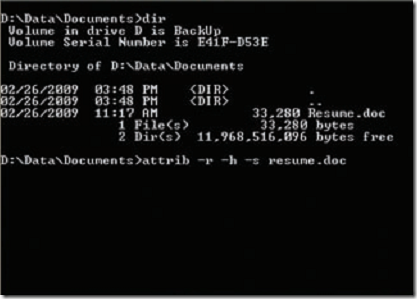
For example, if the stubborn document ‘Resume.doc’ is in ‘D:\Data\Documents’, switch to this path by entering ‘d:’ in the command prompt and type the following ‘cd data\documents’. It might now be possible to delete the file using the command ‘del resume.doc’.
If it still does not work, you will need to reset the ‘Write Protection’, ‘Hidden’ and ‘System’ file attributes before using the ‘del’ command.
Type the following command in the command prompt to reset the attributes of the file:
‘attrib –r –h –s resume.doc’.
You can now use the ‘del’ command to delete the stubborn file. After you are done, bring up the task manager and click on ‘File > New task’ and enter ‘explorer.exe’. You can now close the task manager and begin working as usual.
Quick and easy.
And incredibly useful.
Good work.
THANKS!