
USB drives are the most vulnerable devices for viruses. We already discussed how to remove virus from USB drives manually and protect your PC from being infected by any autorun programs of USB. Here is a freeware called Autorun Eater which can be used to monitor and detect malicious autorun files to prevent malware infections through USB or portable hard drives.
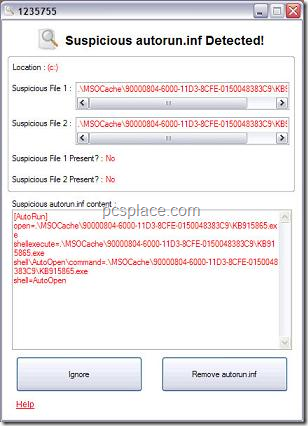
This small utility is an executable file which can run directly without installing and it can automatically scan and remove any suspicious “autorun.inf” files found in the root directory. Once it detects a suspicious autorun file, it will display a warning window as shown below and provide you options to either ignore or remove it. Before deleting the file, Autorun Eater will backup the file automatically and all actions taken will be logged for future reference.
The best feature is that It runs in the background and can be minimized to tray. This will help you check USB or portable hard drives in order to protect your computer from virus or malware infection.
Ԍood post. I am experiencing many of these issues aas well..
Download Link not working…
Looks like a very good tool.. Will check it out soon!!