
We use certain commands frequently; some are very long and irritating to type in again and again. You could use the ‘alias’ command to assign aliases, but the result is temporary. Let’s be smarter, hack a script file, and set permanent aliases for such commands.
Lets know how to Create Permanent Alias for this Command. For our example, we’ll take the command ‘clear’. We use this command very frequently and many a time, it bugs one to re-type it!
-
Let’s set ‘c’ to perform the function of ‘clear’.
-
The temporary method is to use the command #alias c=clear and hit [Enter].
-
Change your directory to /etc/profile.d and open the shell script named ‘colorls.sh’ in a text editor.
-
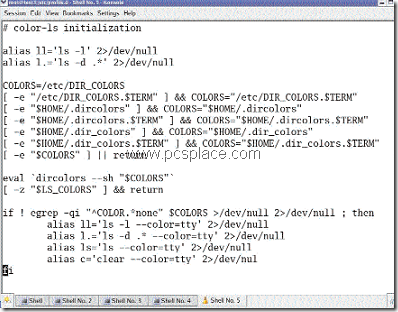
Look for the line “alias ls=’ls –color=tty’2>/dev/null” and copy and paste this line under itself.
-
Now on the line pasted, replace ‘ls’ with ‘c’ and ‘ls – color=tty’ with ‘clear – color=tty’.
The edited colorls.sh file should look as in the screenshot above.
Now open the terminal or konsole window, hit [Enter], and then [C] to check if the alias works. The alias should work even if you reboot your machine. like wise create aliases for all your frequently used commands to simplify your work.