
In order to protect your data from others there are many ways like preventing access to your drives by locking them with the help of a software or you can even lock the folders without using a software so that others can’t open them. Another method is hiding your drives partitions which will make your drives invisible. Here is a cool technique which hides entire hard disk drive partitions by a simple procedure without using Registry editor i.e., regedit.
The procedure just involves some very simple command line prompts which will be as follows:
1. Go to Start > Run and type diskpart. A DOS window will appear with following description. DISKPART>
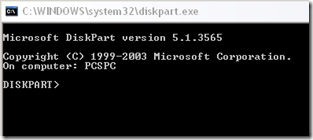
2. Then type list volume
3. Suppose you want to hide drive E:, type select volume 3.
4. A message will now appear in the window saying “Volume 3 is the selected volume”.
5. Now type remove letter E. You may have to reboot the computer.
Diskpart will remove the letter. Since Windows XP doesn’t have the capability to identify the unknown volume, it won’t display or show results from it. To access the contents of the hidden drive, repeat the process, but in the fourth step, replace remove to assign, i.e., assign letter E.
For the people that cannot reassign letter C, try to reassign from here:
“%SystemRoot%\system32\compmgmt.msc /s”
(without quotes)
help please!
I’ve got vista preinstalled into my C drive.
Then I loaded XP into J drive.
While in XP, I used diskpart to try and hide the C drive with the remove command
But now, I can’t add a drive letter back to that volume… I get the error “DiskPart cannot reassign the drive letter on a system, boot or pagefile volume.”
what can I do?… is there some other way of adding this back?
You have made changes to your Main drive C: After re booting windows assumes automatically C: drive that is why you can reassign.
well try to boot in safe mode by pressing F8 key and try to enable your drive.
I know TweakUI which can be used for this. I dont need to use it on my PC as my PC is purely mine…
excellent tip! i’ll surely use it! thx!